Updated November 2026
This XRechnung validator checks e-invoices with the KoSIT validation configuration of 31 August 2026: XML schema, the EN 16931 rules and, for XRechnung files, the German XRechnung rules. It checks ZUGFeRD in the EN 16931 (COMFORT) and XRECHNUNG profiles using the embedded XML. The check runs in your browser. In our comparison of 1,695 files, the validator reached the same decisions as the KoSIT validator.
What the validator checks
KoSIT, the Koordinierungsstelle für IT-Standards (Germany's coordination office for IT standards), describes checking an XRechnung in three steps in specification 3.0.2: „Prüfung der Verwendung eines korrekten Syntaxschemas“ (checking that a correct syntax schema is used), „Prüfung der EN 16931-Regeln“ (checking the EN 16931 rules) and „Prüfung der XRechnungs-Regeln“ (checking the XRechnung rules). The validator runs these steps with the files of the XRechnung validator configuration of 31 August 2026. For invoices under EN 16931 without an XRechnung identifier, such as ZUGFeRD COMFORT, step 3 is skipped.
| Check step | What is checked | Rules | Example |
|---|---|---|---|
| 1. Structure | elements, order and data types | XML schema UBL 2.1 or UN/CEFACT CII D16B | a date in the wrong format |
| 2. EN 16931 | mandatory details, calculation rules, code lists | CEN Schematron 1.3.16 | BR-CO-15: gross must be net plus VAT |
| 3. XRechnung | German extra rules, only with an XRechnung identifier | XRechnung Schematron 2.6.0 | BR-DE-15: buyer reference (BT-10) is missing |
The validator picks the rules from the specification identifier (BT-24) in the file, just as the KoSIT validator does. It checks XRechnung 3.0 in UBL and CII, including the Extension and CVD variants, and invoices under EN 16931 without a national extension. If a file already fails the XML schema, the check stops after step 1, as with the KoSIT validator.
Compared with the KoSIT validator: 1,695 files
A validator is only worth as much as its agreement with the reference. The reference is the KoSIT validator, a Java program with no rules of its own, which KoSIT publishes together with the validation configuration. On 4 November 2026 we used a script to check 1,695 files with this validator (in Node and in Chrome) and with KoSIT validator 1.6.3, both with the validation configuration of 31 August 2026, and compared the reports. We made the damaged files from the valid ones, one error per file: a deleted element, a changed amount, a wrong code, an invalid date or a wrong IBAN.
| Test files | Number | Same decision | Same messages |
|---|---|---|---|
| Sample invoices from the KoSIT XRechnung test suite | 86 | 86 | 86 |
| ZUGFeRD corpus: XML from PDFs, checked | 69 | 69 | 69 |
| ZUGFeRD corpus: recognised by both as not checkable (BASIC, EXTENDED, ZUGFeRD 1.0, older XRechnung) | 56 | 56 | – |
| synthetic invoices from the development of our PDF-to-XRechnung converter | 225 | 225 | 225 |
| deliberately damaged files | 1,259 | 1,259 | 1,258 |
We took all 126 PDFs from the ZUGFeRD corpus; the invoice XML could be read from 125 of them. “Same decision” means both programs accepted the file, rejected it or recognised it as not checkable. “Same messages” means the same rule codes with the same severity. For schema errors, the two programs word and count their messages differently, so there we compared whether the schema was met. The one difference concerns BR-S-08 with a difference of exactly €1.00, right at the rule's tolerance limit. Here this validator reports an error and the KoSIT validator doesn't. The cause is the different conversion of floating-point numbers in Java and in the browser.
We changed one part of the rules. The XRechnung IBAN check (BR-DE-19) calculates with numbers of more than 16 digits, which the XSLT processor SaxonJS 2.7 can't handle precisely enough. We replaced the function with a step-by-step modulo 97 calculation, tested it against an exact calculation with 5,000 IBANs, and confirmed with the KoSIT validator on 225 files that the changed rules produce the same reports as the originals. How we test in general and when we update the rules is explained in How we test.
Error, warning, information: what the messages mean
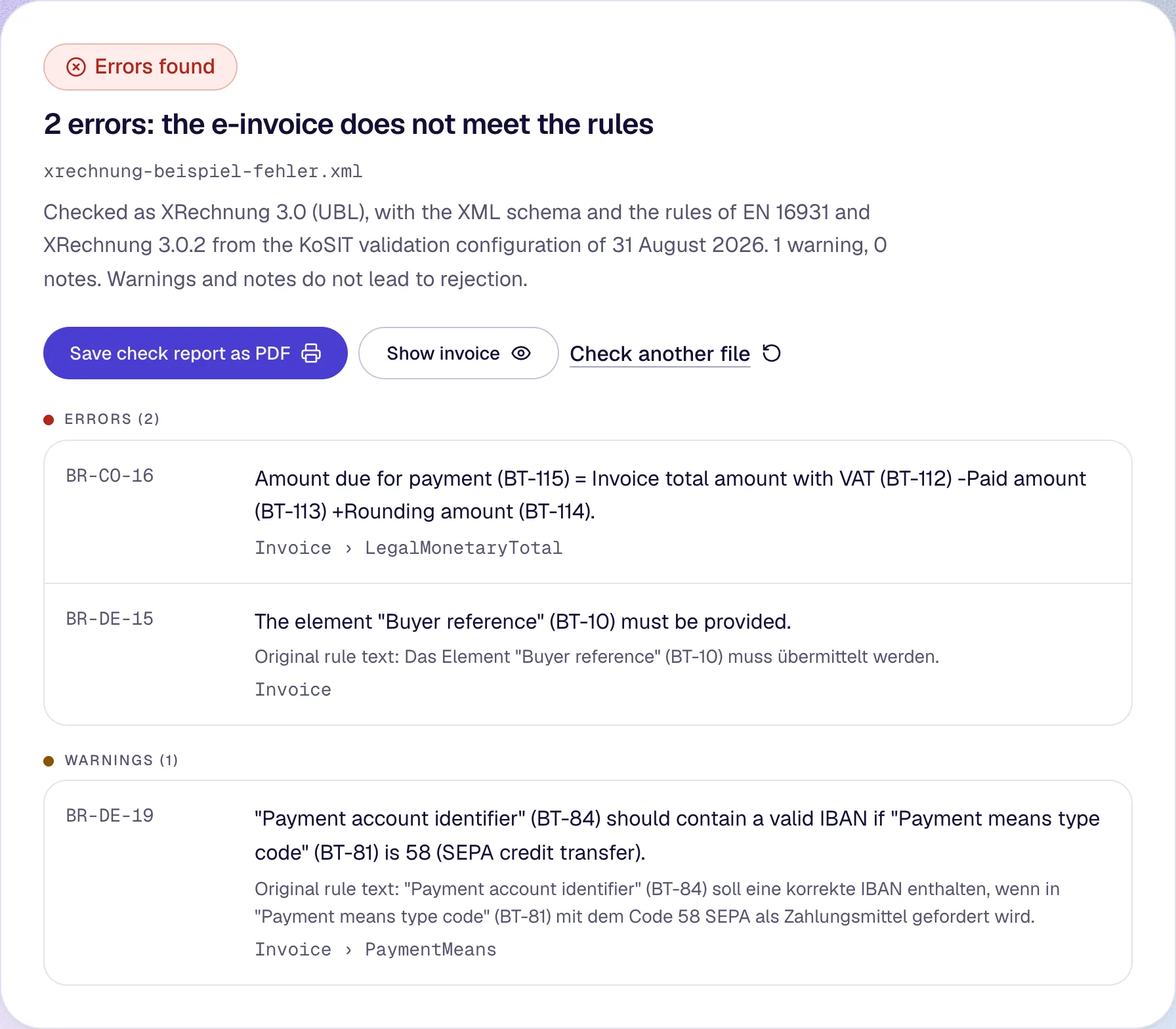
Every rule has a severity. Errors lead to a recommendation to reject the invoice; warnings and information messages don't. According to the KoSIT specification, the receiving party decides whether to accept it. The validation configuration rates some rules differently from the CEN rules; an unknown unit of measure (BR-CL-23), for instance, is only a warning in XRechnung. The validator adopts these ratings. For each message it shows the rule code, the rule's original text and the location in the file.
| Rule | Severity | Meaning |
|---|---|---|
| BR-DE-15 | Error | The buyer reference (BT-10) is missing. It is mandatory in XRechnung; for public bodies it holds the Leitweg-ID. |
| BR-CO-15 | Error | The invoice total including VAT (BT-112) is not the net total (BT-109) plus VAT (BT-110). |
| BR-CO-16 | Error | The amount due for payment (BT-115) doesn't match the gross total, prepayment and rounding. |
| BR-S-08 | Error | The taxable amount for the standard rate (category S) differs by 1.00 or more from the sum of line items, allowances and charges at that rate. |
| BR-DE-19 | Warning | The IBAN (BT-84) fails the check-digit calculation even though SEPA credit transfer (code 58) is given. |
If BT-10 is missing on an invoice between businesses, a placeholder such as “-” is enough for VAT purposes, because no Leitweg-ID (the buyer's routing ID) is needed in B2B (BMF, Q&A, question 6). A placeholder satisfies rule BR-DE-15. BR-DE-15 doesn't check whether a Leitweg-ID is correctly structured; for that there is the Leitweg-ID checker.
Is an e-invoice with errors still an e-invoice?
With a format error, no. With a business rule error, for VAT purposes generally yes. The BMF (Federal Ministry of Finance) distinguishes the two in its letter of 15 October 2025. A format error exists if the file „nicht den zulässigen Syntaxen bzw. deren technischen Vorgaben entspricht“ (does not comply with the permitted syntaxes or their technical requirements) or, with ZUGFeRD, if the XML can't be read correctly and completely. The file is then a „sonstige Rechnung“ (other invoice) (para. 6a). The closest equivalents in the check report are the XML schema messages and a PDF without readable invoice XML. The BMF doesn't map format errors to individual rule codes.
The BMF deals with business rule errors separately (para. 6b). Its examples are a missing buyer reference BT-10 and a tax amount that doesn't match the tax rate. According to the supplementary BMF letter of 15 October 2026, a file with a business rule error but no format error is, for VAT purposes, „dennoch prinzipiell eine E-Rechnung im Sinne von § 14 UStG“ (nonetheless in principle an e-invoice within the meaning of § 14 UStG) (para. 23). A business rule error only leads to a content error if it affects a mandatory VAT detail (para. 22). The invoice is in order if the mandatory details under §§ 14 and 14a UStG are correct and complete. Whether an error affects your input VAT deduction is for your tax adviser to assess in the individual case.
Do you have to validate e-invoices?
It isn't required. The BMF writes in its Q&A (question 7, as of October 2026): „Eine Validierung ist zwar keine unmittelbare Voraussetzung für die steuerliche Anerkennung der Rechnung“ (validation is not a direct requirement for the invoice to be recognised for tax purposes). But it calls validation „sinnvoll“ (sensible) and recommends doing it when the invoice is created and sent. The BMF doesn't recommend any particular validation application.
As the recipient, the responsibility stays with you. According to the BMF letter of 15 October 2025, a validation „ersetzt“ (replaces) „nicht die dem Empfänger obliegende Pflicht zur Überprüfung der Rechnung auf Vollständigkeit und Richtigkeit“ (does not replace the recipient's duty to check the invoice for completeness and correctness); keeping the validation report as evidence is advisable (para. 35a). You can save this validator's check report as a PDF, with file name, date and all messages. A validator doesn't find errors of substance: a wrong but formally valid VAT rate can pass every rule (para. 35a). When which businesses have to issue and receive e-invoices is covered in our guide to e-invoicing in Germany.
ZUGFeRD validator: which profiles are checked
A ZUGFeRD invoice is a PDF with an embedded XML file. The validator reads the XML from the PDF and checks it against the CII D16B XML schema and the EN 16931 rules. The German XRechnung rules (BR-DE) only apply to files with an XRechnung identifier, that is the XRECHNUNG profile. For the other profiles the KoSIT validation configuration has no rules; the Forum elektronische Rechnung Deutschland (FeRD) supplies its own Schematron files per profile, which this validator doesn't run.
| Profile | E-invoice according to the BMF | Checked here | Rules |
|---|---|---|---|
| MINIMUM, BASIC WL | no | no | – |
| BASIC | yes | no | FeRD Schematron only |
| EN 16931 (COMFORT) | yes | yes | XML schema and EN 16931 |
| EXTENDED | yes | no | FeRD Schematron only |
| XRECHNUNG | yes | yes | XML schema, EN 16931 and XRechnung |
In the ZUGFeRD corpus, 56 of the 125 readable files fell outside this validation configuration. The validator recognises such invoices and names the profile; you can display them in readable form in the XRechnung viewer. The validator doesn't check the PDF itself, so it doesn't check whether it meets the PDF/A-3 standard. According to FeRD, such PDF/A errors „lediglich als Warnung zu beachten und sind keine schwerwiegenden Fehler“ (are only to be treated as a warning and are not serious errors).
Other validators: KoSIT and service-bw
The KoSIT validator is free and open source on GitHub (Apache License 2.0); it runs as a command-line program with Java. Without installing anything, you can use the e-invoice validator of the state of Baden-Württemberg, run by IT Baden-Württemberg (BITBW). It accepts XML files up to 15 MB, no PDFs, needs no sign-up and sends the file to its server for checking (according to the page's program code, accessed on 4 November 2026). The federal invoice receipt platform checks invoices when they are submitted; that requires registration.
This validator loads the rules from pdfvera.com and checks the file on your computer. In the Network tab of your browser's developer tools you can see which files the page loads, and the one usage report it sends. Origin and licences of the rules and program files are listed in the licence notices.