Updated November 2026
An XRechnung is a plain XML file. It holds all the invoice data but no picture of the invoice, so you need a viewer to read it. This viewer shows XRechnung files in both syntaxes (UBL and CII) and ZUGFeRD invoices from version 2.0.1 as a normal invoice, recalculates the totals and, if you want, saves a reading copy as a PDF. Your file stays on your computer.
Why an XRechnung won't open like a PDF
An XRechnung usually arrives as an email attachment, for example rechnung.xml. Double-click it and, depending on your computer, it opens in the browser or a text editor. Instead of an invoice you see code with fields like cbc:PayableAmount. The sender did nothing wrong. XRechnung is a „rein strukturiertes Format“ (purely structured format): the file contains every detail but no image. To read the XML file you need „eine zusätzliche Software zur Visualisierung“ (additional software to visualise it), says the BMF (Federal Ministry of Finance) in its Q&A on e-invoicing. In other words, a viewer. Since 2025 every business in Germany has to be able to receive e-invoices, including Kleinunternehmer (small businesses under the VAT threshold), who don't have to issue them.
The viewer turns the fields back into the lines you know from a paper invoice: invoice number, service, VAT, amount due, bank details. In the standard these fields have numbers. The invoice number is BT-1, for example, and the amount due is BT-115.
The XML file
<ubl:Invoice …>
  <cbc:CustomizationID>urn:cen.eu:en16931:2017
    #compliant#urn:xeinkauf.de:kosit:xrechnung_3.0
  </cbc:CustomizationID>
  <cbc:ID>RE-2026-0142</cbc:ID>
  <cbc:IssueDate>2026-10-28</cbc:IssueDate>
  <cbc:DueDate>2026-11-11</cbc:DueDate>
  <cac:AccountingSupplierParty>
    <cac:Party>
      <cac:PartyLegalEntity>
        <cbc:RegistrationName>
          Beispiel Elektrotechnik GmbH
  …
  <cac:LegalMonetaryTotal>
    <cbc:TaxExclusiveAmount currencyID="EUR">753.00
    <cbc:TaxInclusiveAmount currencyID="EUR">891.39
    <cbc:PayableAmount currencyID="EUR">891.39
In the XRechnung viewer
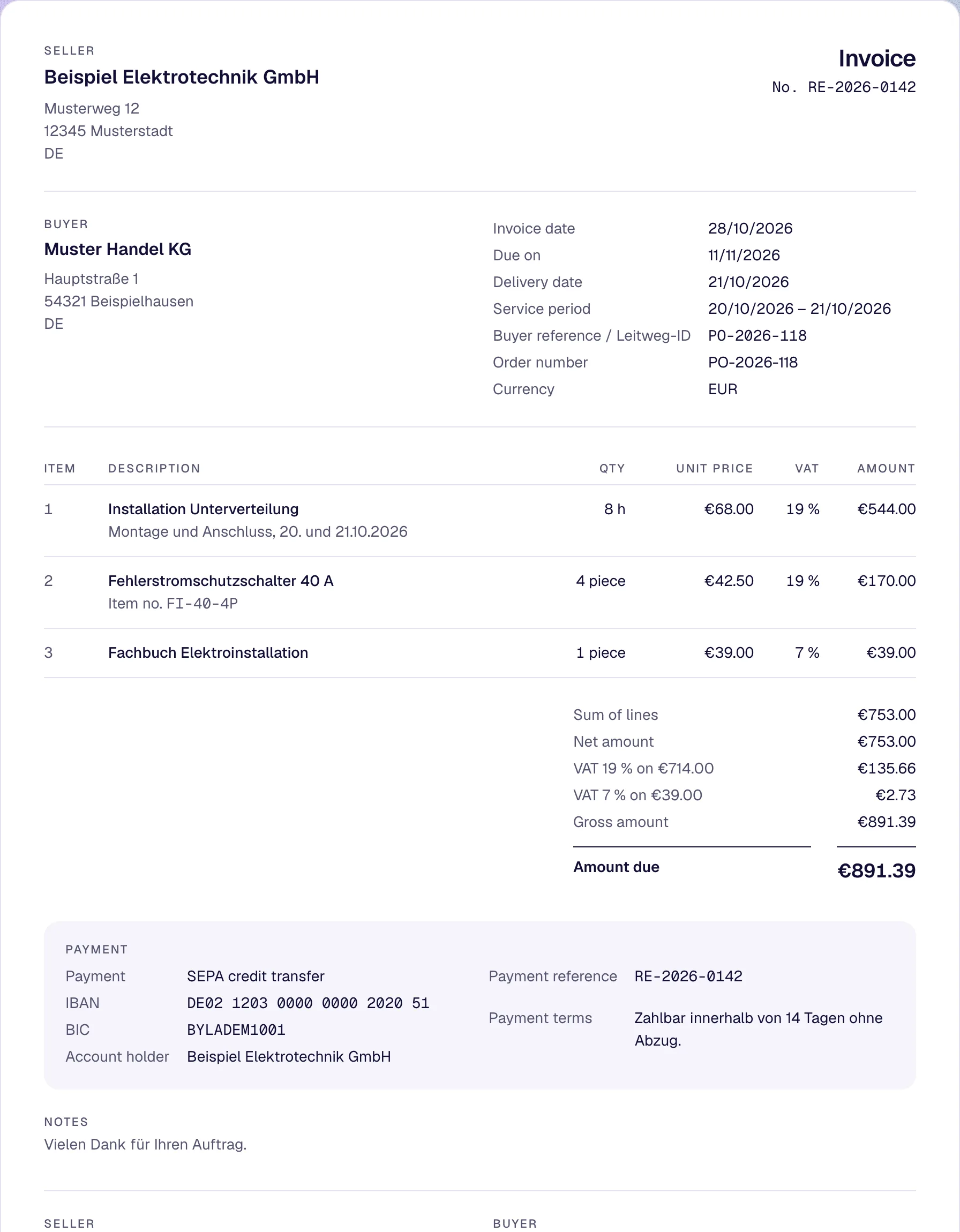
Which files the viewer opens
You can choose an XML file or a PDF file. With a PDF, the viewer looks for the embedded invoice XML and shows only that. Which formats it displays in full, and which count as an e-invoice under the Umsatzsteuergesetz (German VAT Act):
| Format | File | Syntax | Display | Counts as an e-invoice |
|---|---|---|---|---|
| XRechnung 3.0 (and older 2.x) | .xml | UBL 2.1 or UN/CEFACT CII | in full | yes |
| ZUGFeRD from 2.0.1, profiles BASIC, EN 16931, EXTENDED, XRECHNUNG | .pdf with embedded XML | UN/CEFACT CII | in full | yes |
| ZUGFeRD from 2.0.1, profiles MINIMUM and BASIC WL | .pdf with embedded XML | UN/CEFACT CII | with a note, because data is missing | no |
| ZUGFeRD 1.0 | older CII schema | no, with an explanation | no (only from version 2.0.1) | |
| PDF without embedded XML | none | no, with an explanation | no |
The last column follows the BMF letter of 15 October 2024 (paras. 25 and 30), as supplemented by the letters of 15 October 2025 and 2026: XRechnung and ZUGFeRD from version 2.0.1 are e-invoices, except the ZUGFeRD profiles MINIMUM and BASIC WL. The current XRechnung specification is 3.0.2; according to KoSIT, version 3.0 stays in force until at least 31 July 2027.
ZUGFeRD: does the picture count, or the XML?
A ZUGFeRD invoice looks like an ordinary PDF but carries an XML file inside it. Since 1 January 2025 that XML is the actual invoice. This is what the ZUGFeRD FAQ of the Forum elektronische Rechnung Deutschland (FeRD) says, and the BMF recommends in its FAQ „den übermittelten XML-Teil selbstständig zu visualisieren“ (to visualise the transmitted XML part yourself). We think this is the most important point when you check a ZUGFeRD invoice: what the PDF image shows need not match what the XML says.
That is why, for a PDF, this viewer reads only the embedded XML and ignores the image. Put the viewer next to the PDF. If the invoice number, amount due and IBAN match, the two parts agree. If a value differs, the value in the XML is the one that counts.
What the arithmetic check covers, and what it doesn't
Above the invoice, the viewer shows whether the amounts in the file add up. It recalculates five totals:
- The line items add up to the invoice's sum of line amounts.
- Net is the sum of line amounts minus allowances plus charges.
- VAT is the sum of the tax for each VAT rate.
- Gross is net plus VAT.
- The amount due is gross minus prepayment plus rounding.
In the European standard EN 16931 these rules are called BR-CO-10, BR-CO-13, BR-CO-14, BR-CO-15 and BR-CO-16.
The arithmetic check only looks at amounts. Mandatory fields, code lists and the German extra rules are checked by a validator based on the KoSIT rules, such as our free XRechnung validator, which also runs in your browser, or the e-invoice validator of the state of Baden-Württemberg. The tax authorities also offer a free e-invoice viewer in the ELSTER portal. This viewer reads the file directly in your browser and also recalculates the totals.
How we tested the viewer
On 4 November 2026 we ran the viewer's reading module by script against two public collections. From the KoSIT XRechnung test suite (as of 31 August 2026), all 86 test invoices in UBL and CII were displayed. From the ZUGFeRD corpus on GitHub we opened the 126 invoice files (PDF and XML) our project had downloaded from it on 3 November 2026: 106 were read in full, 19 are ZUGFeRD 1.0, and one file is a PDF without embedded XML. For one test invoice with the XRechnung extension, the arithmetic check reported a different amount due, because the extension allows payments by third parties. Since then the viewer skips this one total for invoices with the extension. How we test tools and choose sources is explained in How we test.
Save as PDF: a reading copy for your files
“Save as PDF” opens your browser's print dialog; there you choose “Save as PDF” as the destination. The result is a reading copy, for your records or for colleagues without a viewer. The XML is what you have to keep. Since 2025 the retention period for invoices is eight years (§ 14b UStG), and according to the BMF the structured part of an e-invoice must be kept „in seiner ursprünglichen Form“ (in its original form). For a ZUGFeRD PDF, the “Download XML” button also saves the embedded XML on its own.
Leitweg-ID and buyer reference
In the viewer, the buyer reference (field BT-10) appears under “Buyer reference / Leitweg-ID”. On invoices to public bodies this field holds the Leitweg-ID (the buyer's routing ID), which identifies the office that receives the invoice. Invoices between businesses don't need a Leitweg-ID; for VAT purposes a placeholder such as “-” is enough (BMF FAQ, question 6). For obligations and deadlines, see our guide to e-invoicing in Germany.